For saunas and jjimjilbang · ONDOL
One band, one bill.
ONDOL is our POS for saunas and jjimjilbang. Guests charge the restaurant, shop, scrub and massage to a wristband and pay once on the way out.
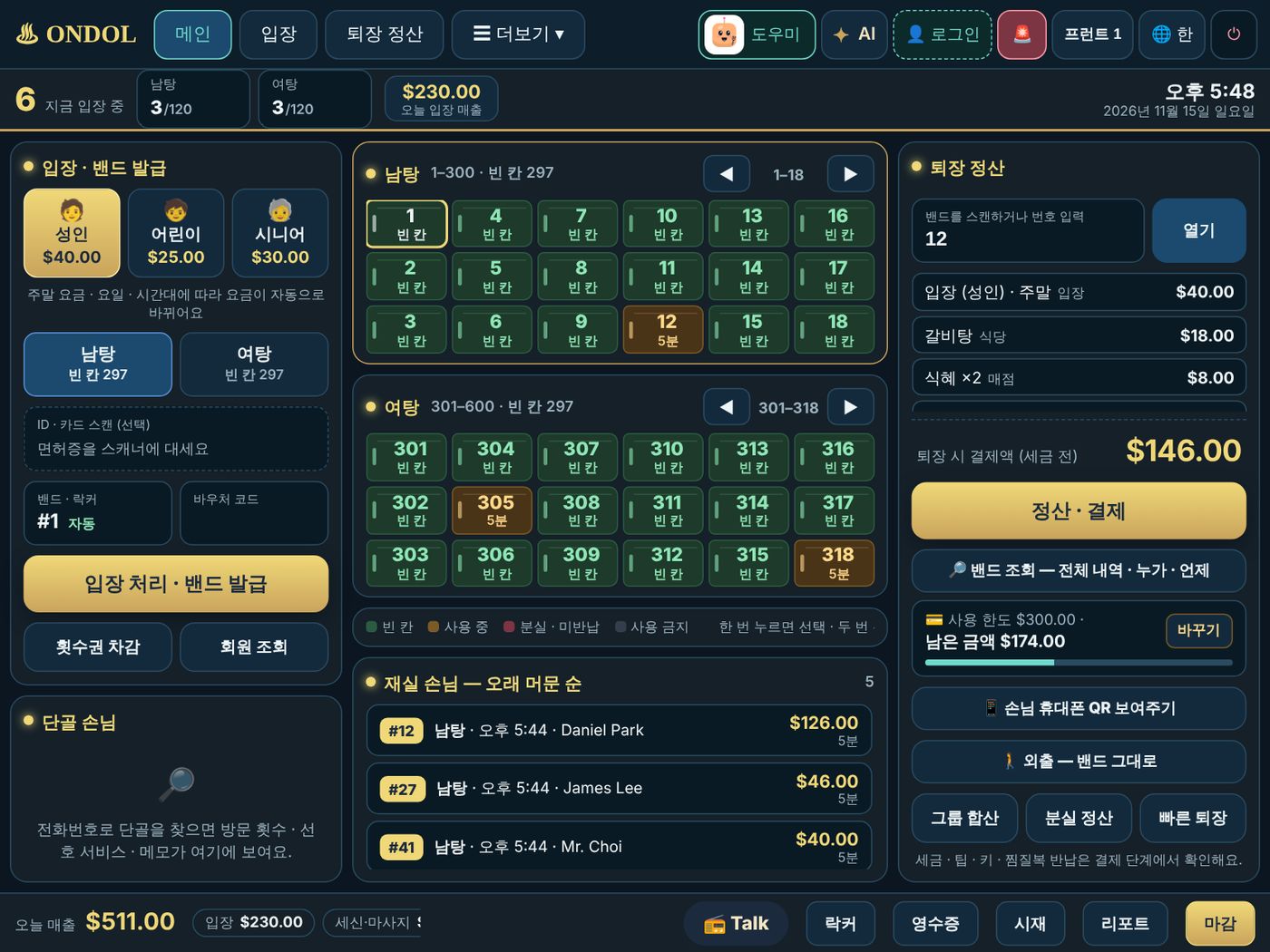
Band = locker = wallet
One number follows the guest all day. Lost keys, unreturned uniforms, overtime and overnight charges are added by themselves.
Check-in in seconds
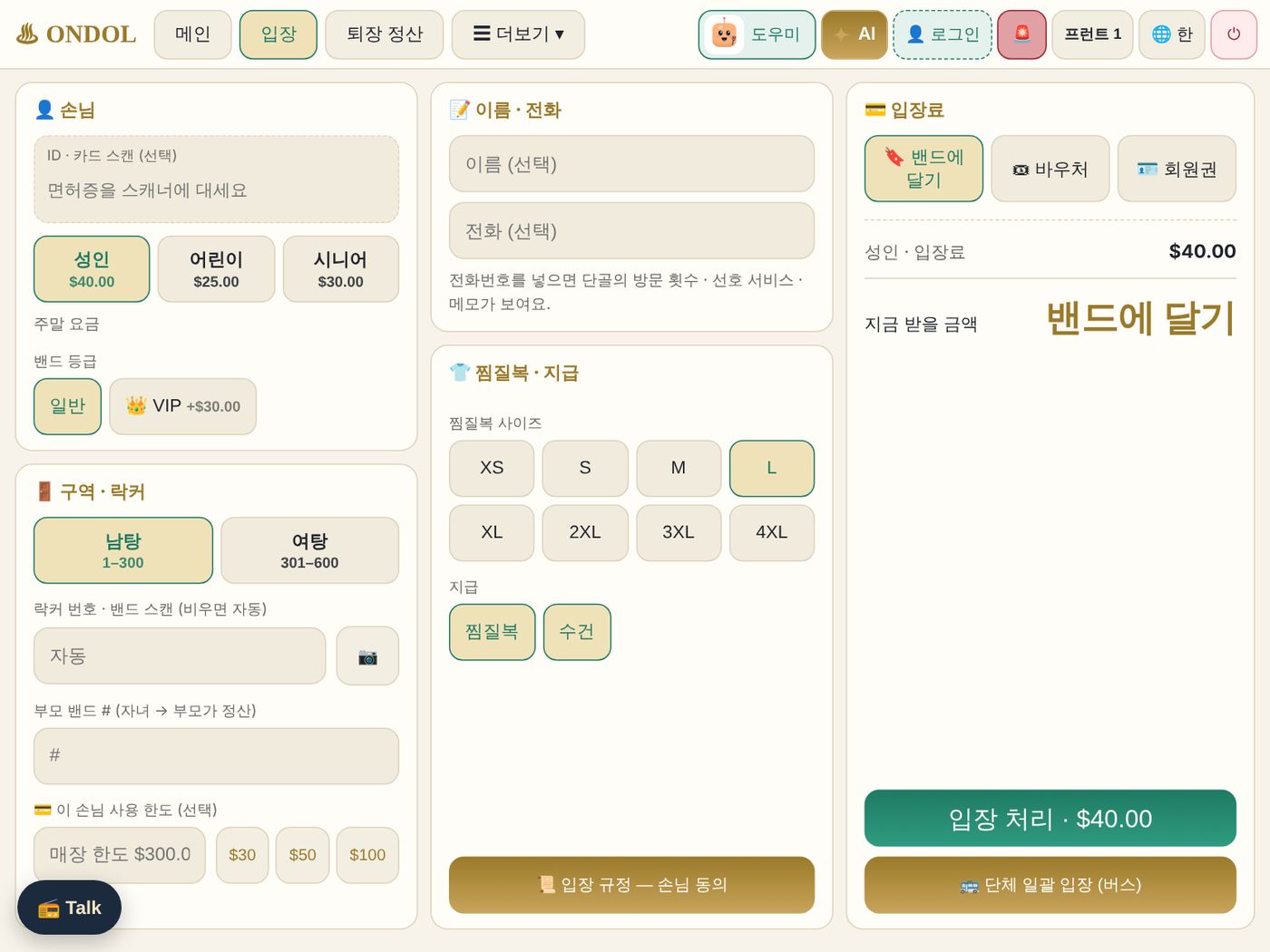
Prices follow the weekday, the hour and holidays. Scan a driver’s licence for name and age; passes, vouchers and gift cards are accepted at the door.
Locker map
Men’s and women’s lockers on one screen — free, in use, lost or blocked. Tap a locker to check in or settle.
Scrub and massage booking
Book by therapist and bed, for one guest or a couple. Guests can book themselves from a hall tablet or their phone.
Spending limits
A store limit for adults and children, and a limit for one guest when they ask. Guests see what is left on their phone.
Tenants and passes
Settle the restaurant, shop and scrub tenants. Monthly passes renew by themselves; money for unused passes is tracked.
Staff, time clock and pay
Clock in with a PIN. Weekly pay with overtime, tips and a printable pay statement, and instructions sent to staff.
Registers and four languages
Several registers on one store server. English, Korean, Spanish and Chinese — each screen in its own language.
Real ONDOL screens
Tap a picture to see it larger.
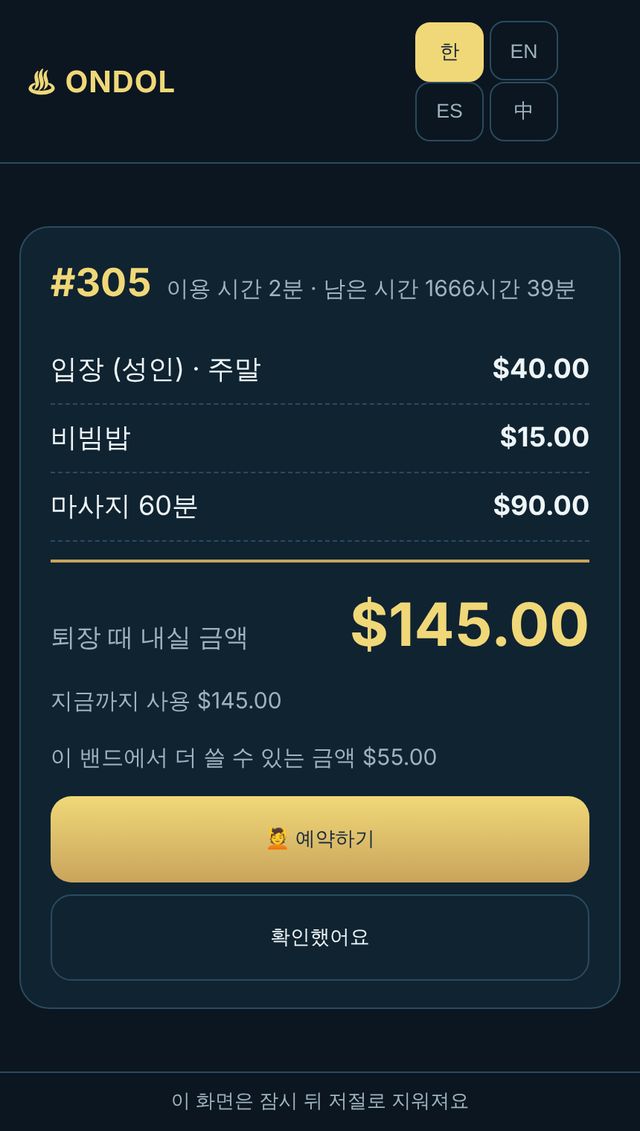
Every screen in the sauna
What ONDOL actually does, from the first guest at the door to the day close.
🚪At the door
- Prices change by weekday, hour and holiday on their own.
- Scan a driver’s licence: the name and age go in, and a minor is flagged at once.
- Passes, visit cards, vouchers and gift cards are accepted at check-in.
- A group checks in together and can put everything on one band.
⌚On the band
- Restaurant, shop, scrub, massage, rooms and massage chairs all charge to the band.
- A spending limit for the store — and one for a single guest who asks for it.
- Guests see their own balance by phone QR or on a hall tablet.
- Stepping out and coming back follows the store’s own rule.
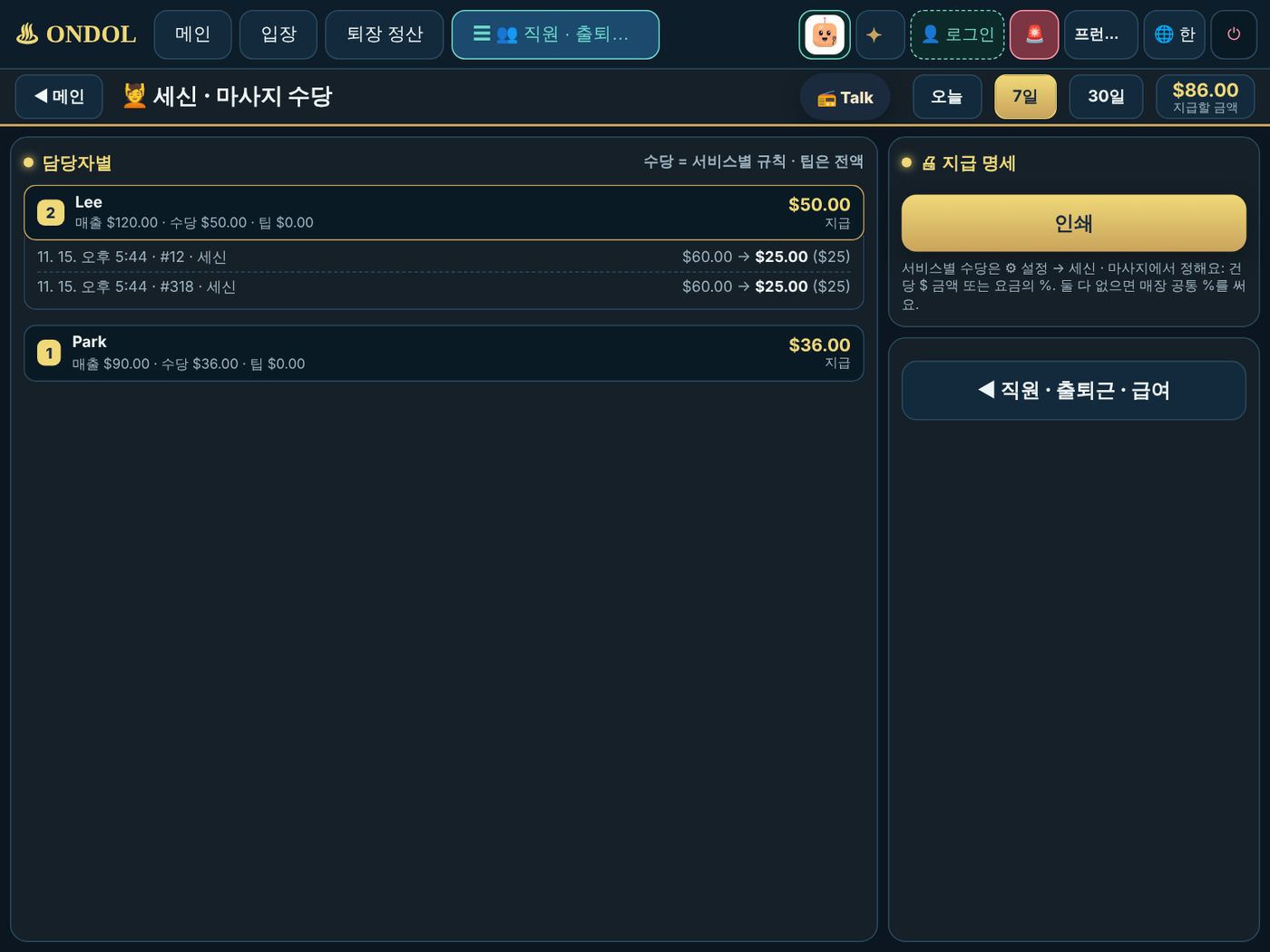
💆Scrub and massage
- Book by therapist and bed, so the same bed is never booked twice.
- Couples and parties are booked for the same time in one step.
- Guests can book themselves — only times with a free therapist and bed are offered.
- Each service pays its therapist a set amount per job or a percentage; tips go to the therapist in full.
🧾On the way out
- Scan the band: every charge is listed and settled in one payment.
- Overtime, overnight, a lost key and an unreturned uniform are added by themselves.
- Settle a whole group on one bill, or let a guest with nothing owed leave with one tap.
- The receipt goes straight to the receipt printer — no print window.
🗄Lockers and bands
- Men’s and women’s lockers on one screen: free, in use, lost, out of use.
- Numbered bands are enough to start; RFID bands and readers are optional.
- Monthly locker rentals with a deposit.
- Look up any band: every charge, who added it and when.
👥Staff
- Clock in, break and clock out with one’s own PIN.
- A manager can correct a missed punch — the reason and the earlier times are kept.
- Weekly pay from the clock: regular and overtime hours, tips, a pay statement to print.
- Instructions to everyone, a role or one person; alerts by radio with Circle Talk.
📊The owner’s numbers
- Sales and guests inside, live on one screen.
- Cash count: what should be in the drawer against what was counted.
- Settlement for tenants — restaurant, shop, scrub.
- Passes sold and used, money owed by guests, reports and the day close.
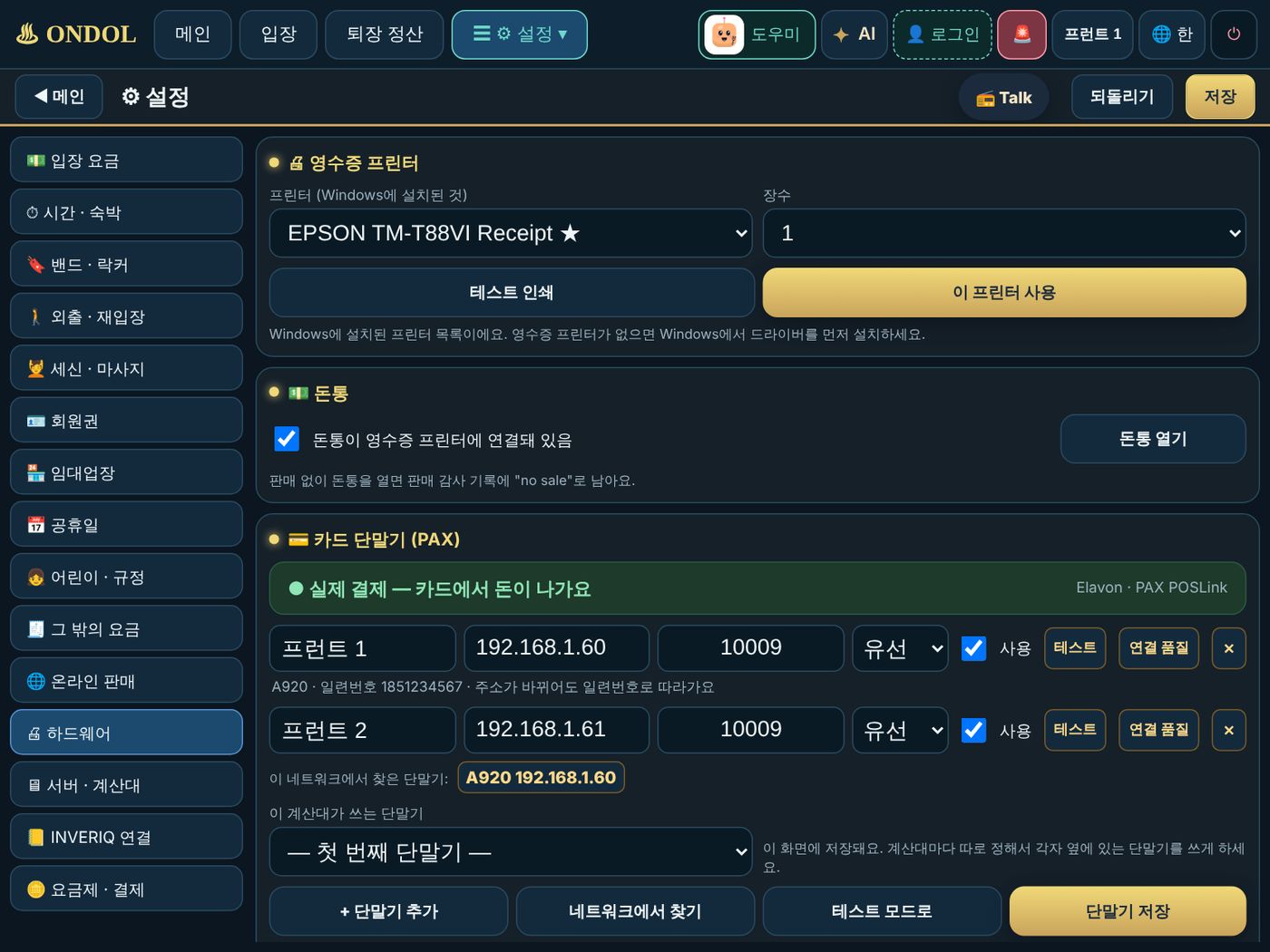
🖥Registers and devices
- Several registers on one store server; a new one joins with a 6-digit code.
- Each register has its own receipt printer and its own card terminal.
- PAX terminals by cable or Wi-Fi, followed even when their address changes.
- English, Korean, Spanish and Chinese; a built-in helper explains each screen.
Works with the rest of Circle
Inveriq
Each closed day goes into accounting — sales, payments, tax and hours.
Websites
Prices, hours and how busy it is go to your website; bookings and pass sales come back.
Circle Payments
PAX terminals at the desk, by cable or Wi-Fi.
Hardware
Touch registers, receipt printers, cash drawers, scanners and tablets.
How to start
Download
Get the program from the download page — or we install it for you.
30 days free
Every feature is open during the trial. No card needed.
Choose a plan in the program
Pay by card on a secure page — the license key goes in by itself.
We help
Setup help and support by email or Circle Remote.
Questions sauna owners ask
Do we need RFID bands?
No. Numbered bands work from day one. RFID bands and readers can be added later.
What happens when a guest loses the band or the key?
The desk finds the guest by locker number or name, adds the lost-key fee the store set, and settles as usual.
Our restaurant is run by a tenant. Can ONDOL handle that?
Yes. What is sold on the band is kept by tenant, and a settlement sheet shows what the house owes each one.
Can a guest be stopped from spending too much?
Yes. The store sets a limit for adults and for children, and the desk can set a lower one for a single guest. A charge over the limit needs a manager.
Do I have to change my card processor?
No. ONDOL works with a PAX terminal; Circle Payments is one choice, not a requirement.
What if the internet goes down?
Check-in, band charges, check-out and printing keep working on the store’s own network. Card payments and online booking need the line.
What computer do I need?
A Windows touch station for each desk — it is drawn for a 1024×768 POS monitor. Tablets are added for the restaurant, hall and scrub room.
Can I try it before deciding?
Thirty days with every feature open, no card needed, and the first month is fully refundable after that.